Have you ever sent an email and immediately realized it contained a mistake? Maybe you attached the wrong file, included incorrect information, or accidentally hit Send before finishing your message. In these situations, many people use the phrase “please disregard my previous email.”
While this expression is clear and widely accepted, it can sound repetitive if you use it often. Learning other ways to say “please disregard my previous email” helps you communicate more professionally, politely, and confidently in business emails.
Whether you’re writing to a client, manager, colleague, customer, or networking contact, choosing the right wording shows professionalism and good email etiquette. A thoughtful replacement can also reduce confusion and make your correction feel more natural.
In this guide, you’ll discover professional alternatives, formal replacements, workplace-friendly phrases, practical examples, and expert communication tips that help you write better emails in every situation.
What Does “Please Disregard My Previous Email” Mean?
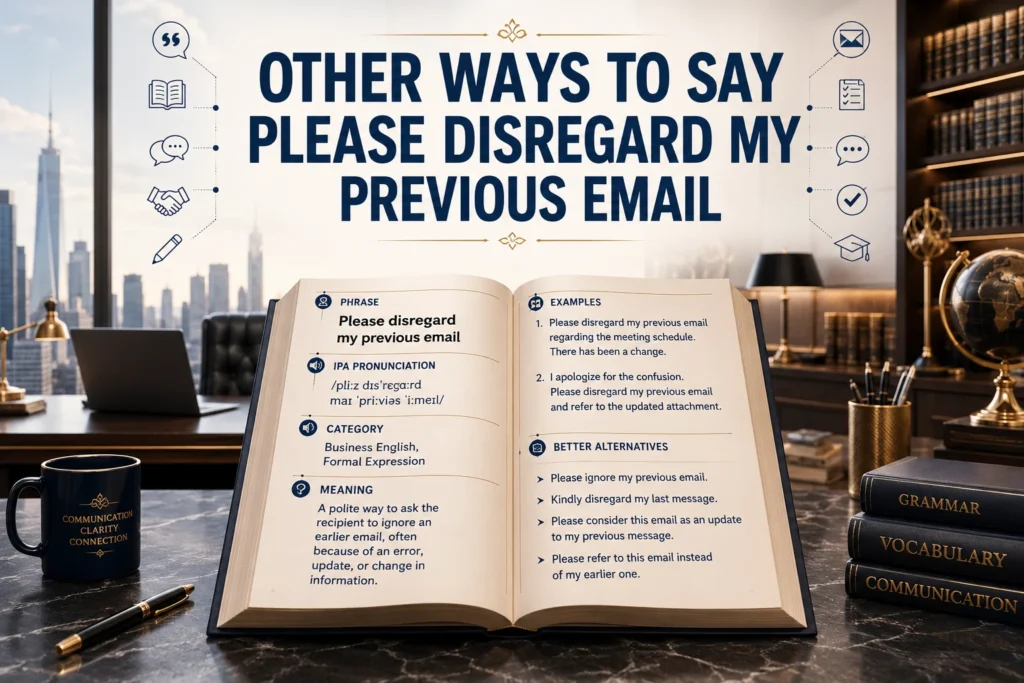
The phrase “please disregard my previous email” politely asks the recipient to ignore an email you sent earlier because it contains incorrect, outdated, incomplete, or unnecessary information.
Instead of acting on the first message, the reader should focus on your updated email.
Literal Meaning
“Disregard” means ignore, pay no attention to, or do not use the previous information.
Example:
Please disregard my previous email. The attached report contained outdated figures.
Tone
The phrase is:
- Professional
- Respectful
- Direct
- Neutral
- Common in business communication
It works well in formal and semi-formal emails.
Purpose
People use this phrase to:
- Correct mistakes
- Replace incorrect attachments
- Update information
- Fix typing errors
- Clarify misunderstandings
- Send the correct version of a document
- Prevent confusion
Emotional Context
Sending a correction email can feel embarrassing, but mistakes happen to everyone.
Using polite language reassures the reader that you’re handling the situation professionally instead of drawing unnecessary attention to the error.
Compare these examples:
❌ Ignore my last email.
✅ Please disregard my previous email. I’ve attached the updated document.
The second version sounds much more respectful and professional.
Examples
Example 1
Please disregard my previous email. I accidentally attached the wrong invoice.
Example 2
Kindly disregard my earlier message. Please refer to the updated schedule below.
Example 3
My apologies for the confusion. Please use the revised file attached to this email.
Example 4
The previous information is no longer accurate. Please see the corrected details below.
When Should You Use This Phrase?
Although it’s common, you should only use it when the previous email should no longer be used.
Here are the most common situations.
1. Sending the Wrong Attachment
Example:
Please disregard my previous email. I’ve attached the correct proposal.
2. Sharing Incorrect Information
Example:
Please disregard the pricing information in my previous email. Please refer to the updated quotation attached.
3. Correcting Dates or Times
Example:
Please disregard my earlier message regarding tomorrow’s meeting. The meeting will now begin at 2:00 PM.
4. Fixing Spelling or Typing Errors
If the typo changes the meaning, sending a correction email is appropriate.
Example:
Please disregard my previous email and accept the corrected version below.
5. Replacing an Entire Email
Sometimes it’s easier to resend the complete email than explain multiple corrections.
Example:
Kindly disregard my previous message. Please refer to this updated version instead.
Professional Usage
In Business Emails
Business emails should be clear and concise.
When correcting an email, avoid sounding defensive. Simply acknowledge the mistake and provide the correct information.
Example:
Please disregard my previous email. The revised contract is attached for your review.
In the Workplace
Employees often send correction emails to coworkers after discovering inaccurate information.
Example:
Kindly disregard my earlier email. The deadline has been extended until Friday.
When Writing to Clients
Clients appreciate transparency.
Instead of hiding the mistake, politely send the correction.
Example:
Please disregard my previous email. The pricing table contained an outdated version. Please find the updated quotation attached.
Customer Service
Support teams frequently send corrections.
Example:
We apologize for the confusion. Please disregard our previous email and refer to the updated instructions below.
Networking Emails
Professional networking requires courteous communication.
Example:
Please disregard my earlier message. I wanted to share the correct meeting link.
Professional Alternatives to “Please Disregard My Previous Email”
Below are professional alternatives that sound natural in modern business communication.
1. Please Ignore My Previous Email
Meaning: Ask the reader not to use your earlier message.
Tone: Professional, direct
Best Use Case: General business emails
Example:
Please ignore my previous email. I’ve attached the correct document.
2. Kindly Disregard My Earlier Email
Meaning: A more polite version.
Tone: Formal and courteous
Best Use Case: Clients and senior management
Example:
Kindly disregard my earlier email and refer to this updated version.
3. Please Refer to This Updated Email Instead
Meaning: Replace the earlier message.
Tone: Professional
Best Use Case: Revised information
Example:
Please refer to this updated email instead, as it contains the latest details.
4. Please Accept This as the Correct Version
Meaning: Indicates the current email replaces the previous one.
Tone: Professional
Best Use Case: Corrected reports and documents
Example:
Please accept this as the correct version of the proposal.
5. My Previous Email Contained an Error
Meaning: Acknowledge the mistake directly.
Tone: Honest and professional
Best Use Case: Internal communication
Example:
My previous email contained an error. Please refer to the corrected information below.
6. Please Use the Information in This Email
Meaning: Direct readers to the updated message.
Tone: Clear
Best Use Case: Workplace communication
Example:
Please use the information provided in this email going forward.
7. I’ve Sent an Updated Version
Meaning: Notify readers of the replacement.
Tone: Friendly professional
Best Use Case: Attachments and reports
Example:
I’ve sent an updated version with the correct figures.
8. Please Consider This Email the Correct Version
Meaning: Officially replaces the earlier message.
Tone: Formal
Best Use Case: Contracts, proposals
Example:
Please consider this email the correct version.
9. My Apologies—Please Refer to This Email Instead
Meaning: Includes a polite apology.
Tone: Warm and professional
Best Use Case: Client communication
Example:
My apologies. Please refer to this email instead.
10. The Previous Email Is No Longer Applicable
Meaning: Earlier information should not be used.
Tone: Formal
Best Use Case: Policy or schedule updates
Example:
The previous email is no longer applicable. Please review the revised details below.
11. Please Use This Updated Information
Meaning: Directs the reader to the latest details.
Tone: Professional
Best Use Case: Corrections
Example:
Please use this updated information moving forward.
12. Please Note the Following Correction
Meaning: Introduces revised information.
Tone: Professional
Best Use Case: Minor corrections
Example:
Please note the following correction to my previous email.
13. I Need to Correct My Previous Message
Meaning: Clearly acknowledges an error.
Tone: Professional and transparent
Best Use Case: Internal teams
Example:
I need to correct my previous message regarding today’s meeting.
14. The Earlier Information Was Incorrect
Meaning: Clarifies that previous details were inaccurate.
Tone: Direct and professional
Best Use Case: Reports and data
Example:
The earlier information was incorrect. Please refer to the revised figures.
15. Please Disregard the Earlier Version
Meaning: Ignore the original version.
Tone: Formal
Best Use Case: Updated files and documents
Example:
Please disregard the earlier version and review the attached file instead.
16. Please Treat This as the Final Version
Meaning: Confirms this email is the authoritative version.
Tone: Professional
Best Use Case: Final reports or presentations
Example:
Please treat this as the final version of the presentation.
17. The Attached File Has Been Updated
Meaning: Indicates a corrected attachment.
Tone: Professional
Best Use Case: Documents and spreadsheets
Example:
The attached file has been updated. Please use this version instead.
18. Please Ignore the Earlier Attachment
Meaning: Refers specifically to an incorrect file.
Tone: Clear
Best Use Case: Attachment corrections
Example:
Please ignore the earlier attachment and review the revised document.
19. I’ve Corrected the Information Below
Meaning: Explains that the current message fixes earlier errors.
Tone: Professional
Best Use Case: Email corrections
Example:
I’ve corrected the information below for your convenience.
20. Please Review the Revised Information
Meaning: Requests attention to updated details.
Tone: Professional and courteous
Best Use Case: Client updates, workplace communication
Example:
Please review the revised information below and let me know if you have any questions.
Featured Snippet Answer
What is a professional way to say “please disregard my previous email”?
Some of the best professional alternatives include:
- Please ignore my previous email.
- Kindly disregard my earlier email.
- Please refer to this updated email instead.
- Please accept this as the correct version.
- Please use the updated information below.
- My apologies—please refer to this email instead.
- Please review the revised information.
- Please consider this email the final version.
Friendly Alternatives
These phrases work well when you have an established relationship with the recipient. They still sound professional but feel warmer and more conversational.
21. Please Ignore My Last Message
Meaning: Ask the reader to ignore your most recent email.
Tone: Friendly, casual professional
Best Use Case: Coworkers and internal teams
Example:
Please ignore my last message. I accidentally sent the wrong version.
22. Sorry About That—Here’s the Correct Information
Meaning: Acknowledge the mistake and provide the update.
Tone: Friendly
Best Use Case: Colleagues
Example:
Sorry about that—here’s the correct information for tomorrow’s meeting.
23. Here’s the Updated Version
Meaning: Introduce the corrected email or document.
Tone: Friendly professional
Best Use Case: Reports and presentations
Example:
Here’s the updated version with the latest revisions.
24. I’ve Made a Small Correction
Meaning: Explain that only a minor change was needed.
Tone: Polite
Best Use Case: Minor edits
Example:
I’ve made a small correction to the schedule below.
25. Please Refer to My Latest Email
Meaning: Direct readers to your newest message.
Tone: Professional
Best Use Case: Multiple emails
Example:
Please refer to my latest email for the correct meeting details.
26. Please Use This Version Going Forward
Meaning: The latest information replaces the old one.
Tone: Professional
Best Use Case: Updated procedures
Example:
Please use this version going forward.
27. Thank You for Your Understanding
Meaning: Show appreciation after correcting a mistake.
Tone: Warm and professional
Best Use Case: Client communication
Example:
Thank you for your understanding. Please use the revised quotation attached.
28. I Appreciate Your Patience
Meaning: Thank the recipient while correcting an error.
Tone: Friendly
Best Use Case: Customer service
Example:
I appreciate your patience. Please see the corrected invoice attached.
29. I Sent That in Error
Meaning: Admit the previous email was sent accidentally.
Tone: Honest
Best Use Case: Accidental sends
Example:
I sent that in error. Please refer to this updated email instead.
30. Please Accept My Apologies
Meaning: Offer a polite apology.
Tone: Formal and respectful
Best Use Case: Clients and managers
Example:
Please accept my apologies. The correct file is attached.
Email Alternatives
31. Kindly Refer to the Updated Attachment
Meaning: Direct attention to the corrected file.
Tone: Formal
Example:
Kindly refer to the updated attachment for the final report.
32. Please See the Revised Document Attached
Tone: Professional
Example:
Please see the revised document attached.
33. This Email Replaces My Previous One
Tone: Direct
Example:
This email replaces my previous one in its entirety.
34. Please Disregard the Earlier Attachment
Tone: Professional
Example:
Please disregard the earlier attachment and use this file instead.
35. The Correct Information Is Below
Tone: Clear
Example:
The correct information is below for your reference.
36. This Is the Most Current Version
Tone: Professional
Example:
Please note that this is the most current version.
37. Please Review the Updated Details
Tone: Professional
Example:
Please review the updated details before our meeting.
38. I’ve Updated the Information
Tone: Friendly professional
Example:
I’ve updated the information based on today’s discussion.
39. Kindly Use This Email for Future Reference
Tone: Formal
Example:
Kindly use this email for future reference.
40. This Supersedes My Previous Email
Meaning: Officially replaces the earlier email.
Tone: Very formal
Best Use Case: Legal and corporate communication
Example:
This email supersedes my previous email regarding the agreement.
Workplace Alternatives
41. Please Refer to the Corrected Schedule
Tone: Professional
Example:
Please refer to the corrected schedule attached.
42. The Deadline Has Been Updated
Tone: Direct
Example:
The deadline has been updated to Friday.
43. The Earlier Information Should Be Disregarded
Tone: Formal
Example:
The earlier information should be disregarded.
44. I’ve Revised the Details
Tone: Professional
Example:
I’ve revised the details after today’s meeting.
45. The Previous Instructions Are No Longer Valid
Tone: Formal
Example:
The previous instructions are no longer valid.
46. Please Follow the Updated Guidance
Tone: Professional
Example:
Please follow the updated guidance below.
47. The Earlier Version Has Been Replaced
Tone: Professional
Example:
The earlier version has been replaced with the attached document.
48. Please Use the Revised Timeline
Tone: Workplace
Example:
Please use the revised timeline for planning.
49. Kindly Ignore the Earlier Notice
Tone: Formal
Example:
Kindly ignore the earlier notice regarding office hours.
50. The Information Has Been Corrected
Tone: Neutral
Example:
The information has been corrected below.
Quick Comparison Table
| Alternative | Tone | Best Use |
| Please ignore my previous email | Professional | General business emails |
| Kindly disregard my earlier email | Formal | Clients and executives |
| Please refer to this updated email | Professional | Updated information |
| Please accept this as the correct version | Formal | Reports and proposals |
| Here’s the updated version | Friendly | Internal teams |
| Please review the revised information | Professional | Workplace updates |
| This email replaces my previous one | Direct | Complete corrections |
| This supersedes my previous email | Very formal | Legal and corporate communication |
| Please use this version going forward | Professional | Procedures and policies |
| I sent that in error | Friendly | Accidental emails |
Email Examples
Client
Dear Sarah,
Please disregard my previous email. The attached proposal includes the latest pricing and project timeline.
Thank you for your understanding.
Manager
Hi James,
Please ignore my previous email. I’ve updated the report with the correct sales figures.
Best regards, Emma
Colleague
Hi Alex,
Sorry about that. Please use this updated spreadsheet instead of the one I sent earlier.
Thanks!
Customer
Dear Customer,
We apologize for the confusion. Please disregard our previous email and refer to the updated delivery information below.
Thank you for your patience.
Networking Contact
Hello David,
Please disregard my earlier email. Here is the correct meeting link for tomorrow’s call.
Looking forward to speaking with you.
Meeting Follow-up
Hi Team,
Please refer to this email instead of my previous message. The meeting will begin at 3:00 PM rather than 2:00 PM.
Thank you.
Common Mistakes
1. Overusing the Phrase
If you frequently send correction emails, recipients may lose confidence in your communication. Always proofread before sending.
2. Using the Wrong Tone
Avoid overly casual phrases like:
- Ignore that.
- Forget my last email.
Instead, use professional wording such as:
- Please disregard my previous email.
- Kindly refer to the updated version.
3. Choosing a Tone That Doesn’t Match the Audience
A phrase suitable for a coworker may not be appropriate for a client or senior executive.
For clients, choose respectful language.
For coworkers, a friendlier tone is usually acceptable.
4. Forgetting to Explain the Correction
Don’t simply write:
Please disregard my previous email.
Instead, explain why:
Please disregard my previous email. I accidentally attached the wrong document.
5. Sending Multiple Corrections
If several errors exist, combine them into one clear follow-up email instead of sending several correction messages.
Related Phrases
| Phrase | Meaning | Example |
| Please ignore my last email | Ignore the previous message | Please ignore my last email. |
| Kindly disregard the earlier message | Formal replacement | Kindly disregard the earlier message. |
| Please refer to the updated version | Use the latest information | Please refer to the updated version attached. |
| My apologies for the confusion | Polite apology | My apologies for the confusion. |
| Please accept the corrected version | Replacement email | Please accept the corrected version. |
| The previous attachment was incorrect | Wrong file | The previous attachment was incorrect. |
| Here’s the revised document | Updated file | Here’s the revised document. |
| Please note the correction | Introduce a correction | Please note the correction below. |
| Updated information follows | New details | Updated information follows. |
| This replaces the previous email | Complete replacement | This replaces the previous email. |
| Please use the latest version | Updated file | Please use the latest version. |
| The earlier email is no longer valid | Old information | The earlier email is no longer valid. |
| Please review the revisions | Updated content | Please review the revisions. |
| Thank you for your understanding | Appreciation | Thank you for your understanding. |
| I appreciate your patience | Customer service | I appreciate your patience while we corrected the issue. |
Phrase Comparison
Choosing the right alternative depends on your audience, the level of formality, and the reason you’re sending a correction. While “please disregard my previous email” is appropriate in most situations, some alternatives sound warmer, more direct, or more formal.
| Phrase | Tone | Formality | Best Use |
| Please disregard my previous email | Professional | High | General business emails |
| Please ignore my previous email | Professional | Medium | Internal and external emails |
| Kindly disregard my earlier email | Formal | High | Clients and executives |
| Please refer to this updated email instead | Professional | Medium | Corrected information |
| Please accept this as the correct version | Formal | High | Contracts, reports, proposals |
| My apologies—please refer to this email instead | Warm | Medium | Client communication |
| This email supersedes my previous email | Very Formal | Very High | Legal and corporate correspondence |
| Here’s the updated version | Friendly | Low | Colleagues and internal teams |
| Please use this version going forward | Professional | Medium | Workplace communication |
| I’ve corrected the information below | Professional | Medium | Updates and clarifications |
Which Alternative Should You Choose?
- For clients: Kindly disregard my earlier email.
- For managers: Please refer to this updated email instead.
- For colleagues: Here’s the updated version.
- For customer service: We apologize for the confusion. Please use the updated information below.
- For legal or official communication: This email supersedes my previous email.
Cultural Usage
Although these expressions are widely understood in English-speaking countries, wording preferences can vary slightly depending on the audience.
US English
American workplaces often favour concise and direct communication.
Common phrases include:
- Please ignore my previous email.
- Please refer to this updated version.
- I’ve attached the corrected file.
These expressions sound natural in most industries, including technology, healthcare, finance, education, and marketing.
UK English
British English generally uses slightly more polite and indirect language.
Common choices include:
- Kindly disregard my earlier email.
- Please accept my apologies.
- Please refer to the revised information below.
These phrases fit traditional corporate environments and formal business correspondence.
Corporate Communication
Large organisations value clarity and consistency.
Best practices include:
- Explain the correction clearly.
- State what changed.
- Attach the correct document.
- Avoid unnecessary apologies.
- Keep the email brief.
Example:
Please disregard my previous email. The attached proposal contains the final pricing approved by our finance team.
Customer Service
Customer support emails should reassure customers while correcting mistakes.
Example:
We apologise for the confusion. Please disregard our previous email and use the updated instructions below.
This approach maintains trust while correcting the information.
Networking
Networking emails should remain friendly and professional.
Example:
Please disregard my previous email. I accidentally included the wrong meeting link. Please use the updated invitation below.
FAQs
What is a professional way to say “please disregard my previous email”?
Professional alternatives include:
- Please ignore my previous email.
- Kindly disregard my earlier email.
- Please refer to this updated email instead.
- Please accept this as the correct version.
- Please review the revised information below.
Is “please disregard my previous email” polite?
Yes. It is a polite, respectful, and widely accepted phrase used in professional communication.
Can I say “please ignore my previous email” instead?
Yes. It is slightly less formal but still appropriate for most workplace emails.
Which phrase sounds most formal?
“This email supersedes my previous email.”
This wording is common in legal, financial, and corporate communication.
Should I apologise after sending the wrong email?
A brief apology is helpful, especially if the mistake may inconvenience the recipient.
Example:
My apologies for the confusion. Please refer to the corrected information below.
Is it better to resend the email or explain the mistake?
If the original email contains significant errors, resend the complete message with the corrected information.
Should I explain why I’m asking someone to disregard my email?
Yes. A short explanation reduces confusion.
Example:
Please disregard my previous email. I accidentally attached the wrong spreadsheet.
Can I use these phrases with clients?
Absolutely. Just choose more formal wording, such as:
- Kindly disregard my earlier email.
- Please accept this as the correct version.
What’s the difference between “ignore” and “disregard”?
Both mean not to pay attention to something.
- Ignore is slightly more conversational.
- Disregard sounds more formal and professional.
Is “disregard” outdated?
No. It remains common in business emails, legal writing, and professional communication.
How can I avoid sending correction emails?
- Proofread carefully.
- Double-check attachments.
- Verify names, dates, and figures.
- Review links before sending.
- Pause for a final read-through.
Can I use these phrases in customer service emails?
Yes. They are commonly used to correct invoices, delivery information, appointment times, and account details.
What’s the best alternative for internal workplace communication?
“Please refer to this updated email instead.”
It is clear, professional, and friendly.
Should I send another email immediately after discovering an error?
Yes. Correct the mistake promptly so recipients don’t act on incorrect information.
Which alternative sounds the most natural in 2026?
Many professionals now prefer:
- Please refer to this updated email instead.
- Please use the updated information below.
- I’ve attached the corrected version.
- Please review the revised document.
These options sound modern, concise, and professional.
Final Summary
The phrase “please disregard my previous email” remains a reliable choice for correcting mistakes in professional communication. However, using alternative wording helps your emails sound more natural, polished, and audience-appropriate. For clients and executives, choose formal expressions such as “Kindly disregard my earlier email” or “Please accept this as the correct version.” For coworkers, simpler options like “Please refer to this updated email instead” or “Here’s the updated version” feel more conversational while remaining professional. Selecting the right phrase improves workplace communication, follows good email etiquette, reduces confusion, and builds trust with colleagues, customers, and business contacts.
Best Professional Options
- Please disregard my previous email.
- Please refer to this updated email instead.
- Please review the revised information.
- Please use the updated information below.
- Please accept this as the correct version.
Best Formal Options
- Kindly disregard my earlier email.
- This email supersedes my previous email.
- Please consider this email the final version.
- The previous information is no longer applicable.
- Kindly refer to the updated attachment.
Best Casual Options
- Please ignore my last email.
- Here’s the updated version.
- Sorry about that—here’s the correct information.
- I sent that in error.
- I’ve made a small correction.
Best Email Options
- Please ignore my previous email.
- Please refer to this updated version.
- Please use this version going forward.
- I’ve attached the corrected file.
- Please review the revised document.