Introduction
If you are looking for other ways to say just to confirm clearly and effectively, you are already doing the hard part. You want to check a detail without sounding unsure, pushy, or cold. You want the other person to feel helped, not tested. That is exactly what a good confirmation phrase should do.
“Just to confirm” is useful, but it gets tired fast. When you use it in every email, it starts to sound automatic. It can also sound a little soft, as if you are unsure of your own message. A small change in wording can fix that. You can sound clear, warm, and sure of yourself while still asking for a quick check.
In this guide, you will learn 35 fresh alternatives that work in real emails, chats, and meetings. You will see when to use a short direct line, when to use a soft polite line, and when to use a formal line for a client or manager. You will also get full email examples, a quick comparison table, and answers to the most common questions about confirming details.
Think of confirmation as teamwork. You are not doubting the other person. You are making sure you both walk away with the same plan. When you say it that way, people thank you for it. In fact, a clear confirmation often earns a reply like thank you for the clarification because you saved everyone from a costly mix-up.
By the end of this article, you will have a simple set of phrases you can copy, adjust, and use with confidence. You will know how to confirm a time, a price, a task, a decision, or a next step without repeating the same line again and again.
Meaning
“Just to confirm” means you want to check that your understanding is right. You are asking the other person to agree, correct, or add one small detail. It is not a demand. It is a friendly check that keeps work moving.
You use it when a detail matters. A meeting time matters. A delivery date matters. A payment amount matters. A task owner matters. When any of these details are unclear, small mistakes grow. A quick confirmation stops that growth early.
The phrase has three parts in its meaning. First, it shows care. You took time to check. Second, it shows clarity. You state what you think is true. Third, it invites a fast reply. You make it easy for the other person to say yes, no, or here is the fix.
For example, if you write, “Just to confirm, we meet at 10 a.m. on Tuesday,” you are really saying three things at once. You believe the meeting is at 10 a.m. on Tuesday. You want to be sure. You welcome a correction if you are wrong. That is why the phrase feels so useful in work emails.
The same idea sits behind many polite work phrases. When you want to show that you understand the point and agree, you still need to name the detail you are confirming. A vague line like “Confirming” helps no one. A clear line like “Confirming our call at 3 p.m. on Thursday” helps everyone.
You can also use “just to confirm” in speech, but writing needs more care. In speech, your tone of voice does half the work. In writing, only your words carry the tone. That is why choosing a slightly warmer or slightly firmer alternative can make a big difference in an email.
In short, “just to confirm” means: here is what I understand, please tell me if I have it right. The alternatives in this guide keep that me
Professional usage
At work, confirmation is not extra work. It is part of the work. A short confirmation can prevent a missed meeting, a wrong order, a late payment, or a task done twice. Good professionals confirm early and confirm in writing.
Use a confirmation when the next step depends on a detail. If you need a yes before you book, buy, send, or start, confirm first. If you are unsure who owns a task, confirm the owner. If two people gave you two different times, confirm the correct one. A two-line email today can save two hours of repair work tomorrow.
Choose your tone based on the relationship. With a new client, use a formal and complete sentence. With a close coworker, use a short and direct sentence. With a manager, use a clear sentence that shows you are ready to act. The goal is always the same: make the right detail easy to spot and easy to answer.
Start with the detail, not with the phrase. Compare these two lines. “Just to confirm, are we still on for tomorrow?” leaves the reader guessing about the time, place, and purpose. “Confirming our project review at 11 a.m. tomorrow in Room 4” gives the reader everything in one line. The second line gets a faster and more useful reply.
You can also pair a confirmation with a next step. For example: “Confirming the report is due Friday at noon. I will send the draft by Thursday for your review.” This style shows that you are not only checking, you are moving the work forward. Managers love this style because it answers the question before they ask it.
When you write to someone for the first time, keep the confirmation warm and complete. If you are reaching out to someone new about a project, add one line of context before your confirmation. For example: “Thanks for sharing the plan. Confirming we start on Monday, May 4, with the kickoff call at 9 a.m.” That line feels polite, clear, and professional.
In busy teams, confirm in the same thread where the decision was made. Do not start a new thread for a small check. Keep the subject line the same, quote the key detail, and ask for a quick yes. This keeps the record clean and helps everyone find the answer later.
Finally, keep your confirmation short. One or two sentences are enough in most cases. If you need to confirm five details, use a short list. A list is easier to check than a long paragraph. It also makes it easy for the other pers
Alternatives
The best alternative depends on your tone. Some moments need a firm line. Some need a soft line. Some need a formal line. Use the groups below to pick fast. Each entry gives you a phrase, a note on tone and best use, and a short example you can copy and adjust.
Professional alternatives
These phrases work in most work emails. They sound clear, calm, and ready to act.
- Confirming that — Professional and direct. Best for stating a fact you want checked. Example: Confirming that the meeting is at 2 p.m. on Wednesday.
- To confirm — Clean and businesslike. Best for opening a short email or message. Example: To confirm, the order ships on Friday.
- I want to confirm that — Confident and clear. Best when you take ownership of the check. Example: I want to confirm that you will send the contract by Monday.
- Let me confirm — Active and helpful. Best for live chats and calls. Example: Let me confirm: we need 200 units by June 1.
- Quick check — Light and professional. Best for a fast check with a coworker. Example: Quick check: are we meeting in Room 2 or on video?
- Just checking that — Friendly and professional. Best for a soft follow-up. Example: Just checking that you received the updated invoice.
- Can you confirm that — Clear and direct. Best when you need a clear yes or no. Example: Can you confirm that the price is 450 dollars in total?
Formal alternatives
These phrases fit clients, senior leaders, official requests, and formal letters. They sound respectful and complete.
- I am writing to confirm that — Very formal and polite. Best for first-time or official emails. Example: I am writing to confirm that our appointment is on April 10 at 10 a.m.
- Please confirm that — Formal and clear. Best when you need written approval. Example: Please confirm that the terms in the attached agreement are correct.
- I would like to confirm — Polite and formal. Best for senior contacts and clients. Example: I would like to confirm our call on Thursday at 4 p.m.
- May I confirm that — Soft and very polite. Best for sensitive or high-stakes details. Example: May I confirm that the payment date is still March 15?
- For the record — Formal and final. Best when you need a clear written record. Example: For the record, we agreed to pause the project until May 1.
- To ensure we are aligned — Formal and team-focused. Best for projects with many people. Example: To ensure we are aligned, the launch date is June 20.
- Kindly confirm — Formal and polite. Best for client emails in many regions. Example: Kindly confirm if the new time works for you.
Direct alternatives
These phrases are short and strong. They work when time is short and the detail must be exact.
- Confirming — Very short and direct. Best for chats and quick updates. Example: Confirming: pickup at 6 p.m. outside the main gate.
- So, we agreed on — Direct and clear. Best for wrapping up a call or meeting. Example: So, we agreed on Friday as the final date.
- To be clear — Direct and firm. Best when you need to remove all doubt. Example: To be clear, the report covers March, not April.
- Let us be clear on this — Firm and direct. Best when past messages were confusing. Example: Let us be clear on this: the budget is 5,000 dollars, not 6,000.
- In short — Short and direct. Best for a quick summary before a check. Example: In short, you will send the files, and I will review them by Tuesday.
- Correct me if I am wrong — Direct and open. Best when you want a fast correction. Example: Correct me if I am wrong, but the deadline moved to next week.
- Is my understanding correct that — Direct but polite. Best for complex details. Example: Is my understanding correct that we deliver in two parts?
Polite alternatives
These phrases sound warm and kind. They work well when you do not want to sound pushy or when you ask for a favor.
- I just wanted to check — Warm and soft. Best for gentle follow-ups. Example: I just wanted to check if Tuesday still works for you.
- I hope I have this right — Humble and polite. Best when you want to sound careful. Example: I hope I have this right: we meet at 9 a.m. on Monday.
- Would you mind confirming — Very polite. Best when you ask a busy person for help. Example: Would you mind confirming the delivery address?
- I wanted to double-check — Friendly and careful. Best for small but important details. Example: I wanted to double-check the spelling of your name.
- Just making sure — Casual and kind. Best for friendly work chats. Example: Just making sure we are still on for lunch at noon.
- Could you please confirm — Polite and standard. Best for most polite emails. Example: Could you please confirm the meeting room?
- I want to make sure we are on the same page — Warm and team-focused. Best for shared plans. Example: I want to make sure we are on the same page about the launch steps.
Email-ready alternatives
These phrases are built for email subject lines, openings, and closings. They sound natural and save time.
- Confirming our plan — Clear email opener. Best for starting a recap email. Example: Confirming our plan: I will draft the post, and you will review it by Friday.
- A quick confirmation — Light email opener. Best for short emails. Example: A quick confirmation: the webinar starts at 7 p.m. on Sunday.
- Before I proceed — Smart and action-focused. Best when you need a yes before you act. Example: Before I proceed, please confirm the final price.
- Before we move forward — Clear and professional. Best for project decisions. Example: Before we move forward, can you confirm the timeline?
- Please let me know if I missed anything — Open and helpful. Best for recaps with many details. Example: I have listed the next steps below. Please let me know if I missed anything.
- Does this look right to you — Friendly and open. Best for drafts and plans. Example: The schedule is below. Does this look right to you?
- Can we lock this in — Warm and action-focused. Best when you want a final yes. Example: Can we lock this in for Thursday at 3 p.m.?
Quick comparison
Use this table when you need to pick fast. It shows the tone and the best moment for each top pick. Pick the one that fits your reader, not just the one you like most.
| Alternative | Tone | Best use |
|---|---|---|
| Confirming that | Professional | Stating a fact in a work email |
| Please confirm that | Formal | Asking for written approval |
| To be clear | Direct | Removing doubt after confusion |
| I just wanted to check | Polite | Gentle follow-up with a coworker |
| Before I proceed | Email-ready | Getting a yes before you act |
| Correct me if I am wrong | Direct | Inviting a fast correction |
| Kindly confirm | Formal | Polite client email |
| Just making sure | Polite | Friendly chat or quick check |
| Can we lock this in | Email-ready | Getting a final yes on a plan |
| I would like to confirm | Formal | Senior leader or new client |
If you only remember three phrases, remember these. Use “Confirming that” for most work emails. Use “Could you please confirm” for polite requests. Use “Before I proceed” when you need approval to act. These three cover almost every normal work moment.
Notice how each top pick names the detail. A good confirmation never hides the detail. It puts the time, date, amount, or task in the same sentence as the phrase. That is what makes it clear and effective.
Email examples
Examples help more than rules. Read these full emails, then copy the structure. Change the names, dates, and details to fit your own message. Keep the tone calm and the detail clear.
Example 1: Confirming a meeting time
Subject: Confirming our call on Thursday at 3 p.m.
Hi Sara,
Thanks for your message. Confirming our call on Thursday at 3 p.m. on Zoom. I will send the link in the morning.
Please let me know if that time still works for you.
Best,
Ali
Why it works: It states the day, time, and place in one line. It asks for a quick reply. It keeps the email short.
Example 2: Confirming a task owner
Subject: Quick confirmation: report owner
Hi Team,
Confirming that Maria will own the monthly report, and I will review it by Friday at noon. The report covers March sales and costs.
Please let me know if I missed anything.
Thanks,
Dan
Why it works: It names the owner and the deadline. It gives the scope. It invites a fix if the plan is wrong.
Example 3: Confirming a price with a client
Subject: Confirming the final price
Dear Mr. Khan,
I would like to confirm our agreed price of 1,200 dollars for the full project. This includes design, writing, and two rounds of changes.
Please confirm that this matches your records. Once you confirm, I will send the invoice.
Kind regards,
Nadia
Why it works: It uses a formal tone for a client. It lists what the price covers. It links the confirmation to the next step.
Example 4: Confirming a delivery plan
Subject: Before we move forward: delivery date
Hi John,
Before we move forward, can you confirm the delivery date is May 20? The order includes 150 units for the main store.
If that date works, I will book the transport today.
Thanks,
Emma
Why it works: It uses “Before we move forward” to show action depends on the answer. It gives the quantity and place. It states what happens next.
Example 5: Confirming after a call
Subject: Recap of our call today
Hi Priya,
Thanks for the helpful call. To ensure we are aligned, here is what we agreed:
- You will send the updated brief by Wednesday.
- I will share the first draft by Friday.
- We will meet again on Monday at 10 a.m.
Does this look right to you? I look forward to your call on Monday to review the draft together.
Best,
Sam
Why it works: It turns a call into a clear written record. The list makes each item easy to check. The closing question invites a simple yes.
Example 6: Soft confirmation with a busy manager
Subject: Quick check: Friday deadline
Hi Ms. Lee,
I just wanted to check if the Friday deadline for the budget sheet is still correct. I have finished most of it and will share the draft by Thursday.
Please let me know if the date has changed.
Thank you,
Omar
Why it works: It sounds respectful. It shows progress. It asks for a small update, not a long reply.
Common mistakes
Even a good phrase can fail if you use it the wrong way. Watch for these common mistakes. Fixing them will make your emails clearer at once.
First, do not confirm without naming the detail. “Just to confirm” alone says nothing. Always add the time, date, amount, name, or task in the same sentence. A reader should not need to open an old email to understand your message.
Second, do not confirm too many details in one long sentence. Long sentences hide the key point. Break a long confirmation into two short sentences or a short list. Short lines are easier to read and easier to answer.
Third, do not sound unsure when you are sure. Phrases like “I think maybe we meet at 10?” make you sound lost. If you know the detail, state it. “Confirming we meet at 10 a.m.” sounds calm and sure. If you are truly unsure, say so plainly: “I am not sure about the time. Is it 10 a.m. or 11 a.m.?”
Fourth, do not use a confirmation to hide a new request. Do not write, “Just to confirm, can you also finish the whole report by today?” That is not a confirmation. That is a new task dressed as a check. Keep confirmations for checking. Make new requests in a clear separate sentence.
Fifth, do not repeat “just to confirm” in every email to the same person. Repetition makes your writing feel robotic. Rotate your phrases. Use “Confirming that” one day, “Quick check” the next, and “Before I proceed” when you need approval. Small variety keeps your emails fresh.
Sixth, do not forget the next step. A confirmation should lead somewhere. After you state the detail, add one line about what happens next. For example: “Once you confirm, I will send the files.” This helps the reader see why the reply matters.
Seventh, do not rush a person who is waiting on others. If someone is waiting for approval, a pushy confirmation can feel rude. In that case, add a patient line. You can say, “No rush, and please be patient with me while I check the final detail” is not the right line here. Instead, show patience toward them: “Please take your time. A short yes or no when you can would help.” Patience builds trust.
Eighth, do not confirm in a new thread when the old thread holds the context. Keep the record in one place. Reply in the same thread, quote the key line if needed, and keep the subject line the same.
Finally, do not skip written confirmation after a call. Calls are easy to forget. A two-line recap email after a call protects both sides. It turns spoken words into a shared record that anyone can check later.
Related phrases
“Just to confirm” belongs to a large family of checking phrases. Learning the nearby phrases helps you pick the right one for each moment. Some phrases check facts. Some phrases check feelings. Some phrases close a loop.
“To clarify” checks meaning. Use it when a sentence could have two meanings. For example: “To clarify, do you mean the March report or the April report?” This phrase fixes confusion about words, not about plans.
“To recap” sums up what was said. Use it after a long meeting or call. For example: “To recap, we agreed on three steps.” This phrase helps everyone leave with the same picture.
“To double-check” adds a layer of care. Use it when a detail is small but costly if wrong. For example: “I wanted to double-check the account number before I send the payment.” This phrase shows care without sounding worried.
“To follow up” checks progress. Use it when you wait for an answer or a task. For example: “Following up on my last email about the contract.” This phrase is about time and action, not about a single fact.
“To verify” sounds formal and exact. Use it for numbers, names, legal details, or safety facts. For example: “Please verify the spelling of the company name.” This phrase fits official forms and records.
“To make sure” is warm and simple. Use it in friendly work chats. For example: “I want to make sure we are on the same page.” This phrase feels like teamwork.
Each phrase has its own job. “Just to confirm” checks a shared understanding. “To clarify” fixes meaning. “To recap” sums up. “To verify” checks exact facts. When you know the difference, your emails become sharper and your replies become faster.
Phrase comparison
Many phrases look alike, but they do not feel alike. The right choice depends on how sure you are, how formal the moment is, and how fast you need an answer. This section compares close pairs so you can choose with confidence.
“Just to confirm” versus “To confirm”: Both are correct. “Just to confirm” feels softer and more conversational. “To confirm” feels cleaner and more direct. In a short business email, “To confirm” often wins because it wastes no words. In a friendly email, “Just to confirm” can feel warmer.
“Confirming that” versus “Please confirm that”: The first states your understanding. The second asks for approval. Use “Confirming that” when you want the other person to check your line. Use “Please confirm that” when you need their clear yes before you act. The difference is small, but it changes who must act next.
“Correct me if I am wrong” versus “Is my understanding correct”: Both invite a fix. The first sounds casual and open. The second sounds careful and formal. Use the first with coworkers you know well. Use the second with clients, leaders, or in complex projects where the detail has many parts.
“To be clear” versus “To clarify”: “To be clear” states a fact in a firm way. It works when past messages were messy. “To clarify” asks about meaning. It works when a word or sentence could be read two ways. Use “To be clear” to close doubt. Use “To clarify” to open a question.
“Just checking” versus “Just making sure”: Both are soft and friendly. “Just checking” asks about a fact or a status. “Just making sure” asks about shared understanding. For example: “Just checking if you got my file” checks delivery. “Just making sure we meet at 10” checks a shared plan. Pick the one that matches your goal.
“Before I proceed” versus “Before we move forward”: Both link confirmation to action. “Before I proceed” puts the action on you. “Before we move forward” puts the action on the team. Use the first when you wait for approval to do your own task. Use the second when the whole team waits for a shared decision.
“Kindly confirm” versus “Could you please confirm”: Both are polite. “Kindly confirm” is short and common in many work cultures, especially in South Asia and the Middle East. “Could you please confirm” is longer and common in American and British business English. Both are correct. Pick the one your reader will find most natural.
When in doubt, choose the clearer phrase, not the fancier one. Clarity beats style. A plain sentence that names the detail will always beat a polished sentence that hides it.
Cultural usage
Culture shapes how direct a confirmation should sound. In some cultures, a direct line feels efficient. In others, a direct line can feel abrupt. A good writer reads the room and adjusts the tone.
In American business English, short and direct confirmations are normal. “Confirming: meeting at 2 p.m.” is seen as clear and helpful. People expect fast replies and short emails. You do not need many soft words to sound polite.
In British business English, soft polite lines are more common. “Could you please confirm” and “I just wanted to check” feel natural. A very short line can feel a bit cold if you do not know the person well. Add one warm line at the start or end.
In many South Asian work cultures, formal polite phrases like “Kindly confirm” are normal and respected. They show respect for the reader. A short direct line is still fine with close coworkers, but a polite line works better with clients, teachers, and senior staff.
In many Middle Eastern work cultures, a warm opening matters. Start with a greeting and a short thank-you line. Then add your confirmation. This order shows respect and builds a good relationship before you ask for a check.
In many East Asian work cultures, indirect and humble phrasing is valued. “I hope I have this right” and “Would you mind confirming” can feel more respectful than a very firm line. Keep the detail clear, but keep the tone gentle.
In global teams, keep your English simple. Avoid slang. Avoid long idioms. Write short sentences. State the time zone when you confirm a meeting time. For example: “Confirming our call at 3 p.m. Pakistan time (PKT).” This small detail prevents a large mix-up.
Also, remember that tone in writing is easy to misread. A line that feels direct to you may feel sharp to someone else. When you write across cultures, add one warm word. Words like “thanks,” “please,” and “helpful” soften a message without making it weak. A simple line like “I appreciate it” at the end of an email can turn a plain check into a kind message.
Finally, watch for time and date formats. Different countries write dates in different orders. Write the month as a word to avoid confusion. Write “May 4” instead of “04/05.” That small choice makes your confirmation clear for every reader.
Frequently asked questions
What does just to confirm mean in an email?
In an email, “just to confirm” means you want to check that your understanding is correct. You state the detail you believe is true and invite the other person to agree or fix it. It is a polite way to prevent mistakes before they happen.
Is just to confirm polite?
Yes, it is polite in most work emails. It sounds helpful because you are checking a shared detail, not giving an order. To make it even warmer, add “please” or a thank-you line, such as “Could you please confirm the time? Thanks so much.”
What is a more professional way to say just to confirm?
A more professional option is “Confirming that” or “I would like to confirm.” Both sound clear and confident. For formal approval, use “Please confirm that the details below are correct.” These phrases work well with clients and senior leaders.
How do I confirm a meeting time without sounding pushy?
Name the time and ask for a short reply. For example: “Confirming our meeting at 10 a.m. on Tuesday. Please let me know if that still works.” This line is clear and kind. It gives the reader an easy way to say yes or suggest a new time.
Can I use just to confirm in a formal letter?
Yes, but a fuller phrase often sounds better in a formal letter. Use “I am writing to confirm that” or “I would like to confirm.” These phrases fit the formal tone of a letter and give the reader a complete sentence to respond to.
What should I write instead of just to confirm in a short chat message?
In a chat, use a short line like “Confirming: 3 p.m.?” or “Quick check: still on for today?” Short lines work well in chats because the reader can answer with one word. Keep the detail in the same message so the reply is fast.
How do I confirm multiple details in one email?
Use a short list. List each detail on its own line, then ask, “Please let me know if any of these need a fix.” A list is easier to check than a long paragraph. It also makes it easy for the reader to reply to one item without retyping the whole email.
Is kindly confirm correct English?
Yes, “kindly confirm” is correct and common in many work cultures. It sounds formal and polite. In American business English, “Could you please confirm” is more common, but both are clear and correct. Pick the one your reader will find most natural.
How do I confirm something after a phone call?
Send a short recap email within the same day. Start with thanks, list what you agreed, and end with a check. For example: “Thanks for the call. Confirming we agreed on Friday as the deadline. Does this look right to you?” This creates a written record for both sides.
What is the difference between confirm and verify?
Confirm means to state that something is true or agreed. Verify means to check with proof or records. You confirm a meeting time. You verify a bank account number or a legal name. Verify sounds more formal and exact, while confirm sounds more general and everyday.
How can I confirm a price without sounding rude?
State the price, list what it covers, and ask for a simple check. For example: “Confirming the total is 800 dollars, including delivery. Please let me know if that matches your records.” This tone is clear and fair. It shows you want accuracy, not conflict.
Should I use just to confirm with my boss?
Yes, you can use it with your boss, but keep it clear and action-focused. Try: “Confirming the report is due Friday at noon. I will share the draft by Thursday.” This style shows you are organized and ready. It saves your boss time and earns trust.
What is a soft way to confirm with a client?
Use a polite and warm phrase like “I just wanted to double-check” or “Would you mind confirming.” Add a thank-you line. For example: “Would you mind confirming the delivery address? Thank you so much for your help.” Soft words plus a clear detail make a client feel respected.
Can I start an email with just to confirm?
Yes, you can start an email with it, but a warmer opening often works better. Try one short greeting first, such as “Hi Sara, thanks for your message.” Then add your confirmation. This order feels more human and less abrupt.
How do I ask for confirmation without repeating the same phrase?
Rotate your phrases across emails. Use “Confirming that” one day, “Quick check” the next, and “Before I proceed” when you need approval. Keep a small list of your favorite phrases and pick a new one each time. Variety keeps your writing fresh and professional.
Conclusion
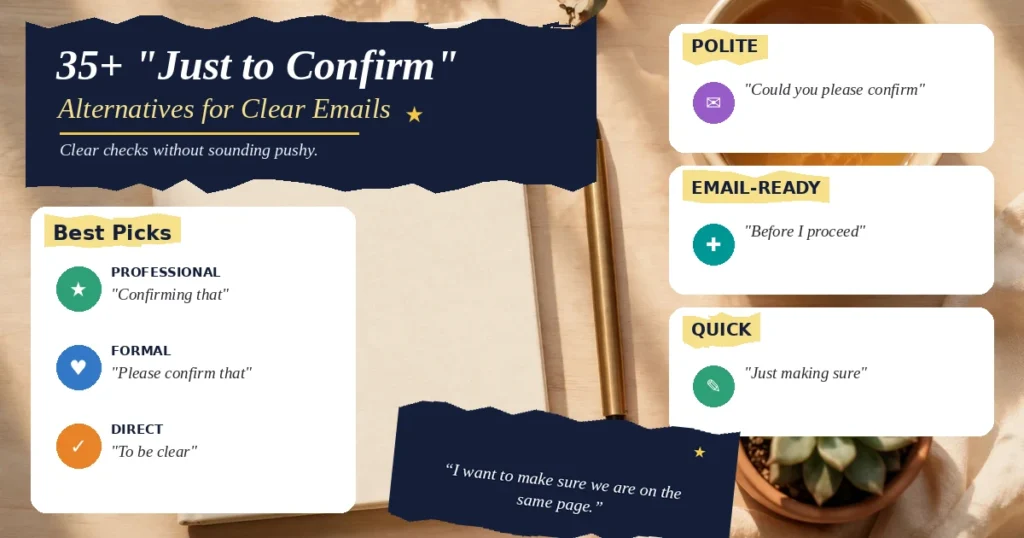
If you want a fast pick, use these best picks. For professional emails, use “Confirming that” and “To confirm.” For formal emails, use “Please confirm that” and “I would like to confirm.” For direct checks, use “To be clear” and “Correct me if I am wrong.” For polite checks, use “Could you please confirm” and “I just wanted to check.” For email-ready openings, use “Before I proceed” and “Can we lock this in.” Each one names the detail and invites a quick reply.
A good confirmation is a small act of care. It says you value the other person’s time, you want the plan to work, and you are ready to act. You do not need fancy words. You need a clear detail, a calm tone, and a simple next step. Pick one phrase from this guide, use it in your next email, and notice how fast and kind the reply feels.
For the exact meaning of the verb, see the dictionary entry for confirm. It shows how this small word carries a promise: what you say is checked, clear, and ready to trust.